 By Claire Whitaker
Updated November 2026
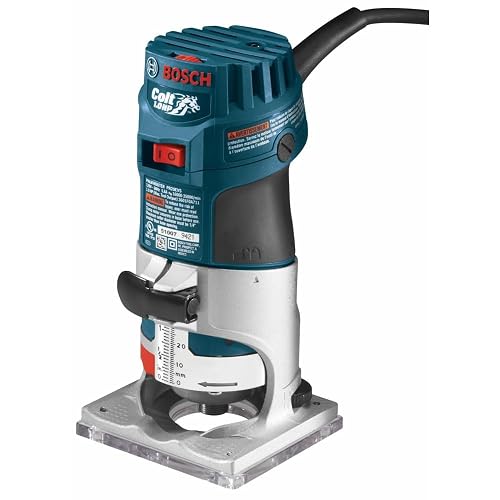
When a wood router stopped working mid-cut, the cause is usually one of a handful of things: no power reaching the motor, a worn or failed carbon brush, a loose or dirty collet, a damaged bit, a tripped thermal protector, or a switch or cord fault. This guide walks through each check in the order that finds the most common problems fastest, so you can get back to your project or know when it is time to send the tool to a service center.
Safety First: Before You Open Anything
Unplug the router before you inspect, adjust or touch the bit. Many routers have a spindle lock and some keep the motor warm for a few minutes after shutdown, so give it time to cool before handling the motor housing. If you are not comfortable working with electrical components, stop at the visual checks and take the tool to a qualified repair shop. Wear eye protection and keep your hands clear of the bit whenever the router is connected to power.
Shopping for one? See our guide: 5 Best Wood Working Router Bits for Every Project (2026).
Step 1: Check the Power Supply
Start with the simplest explanation. A router that will not start often has no power, not a broken motor.
- Confirm the outlet works by plugging in a lamp or another tool.
- Inspect the power cord along its full length for cuts, crushed sections, or heat-darkened insulation near the plug. Pay special attention to the spot where the cord enters the router body, since that is where it flexes most.
- If you use an extension cord, plug the router directly into the wall to rule it out. Check that the cord is rated for the router’s amperage.
- If the outlet is on a GFCI circuit, press the reset button. A tripped GFCI will kill power to the tool without any other sign.
- Check the circuit breaker. A router pulling heavy current on a deep cut can trip a breaker that is shared with other loads.
Step 2: Test the Switch and Speed Controls
Many routers have a trigger-style or toggle switch and, on variable-speed models, a dial. Either can fail. Look for a loose housing, a switch that feels mushy or does not click, or a speed dial that will not reach its full range. If the router runs on one setting but not another, the speed electronics or the switch contacts are the likely cause. Switch replacement is a common repair, but if the switch is integrated with a soft-start or electronic speed board, a service technician is the safer choice.
Step 3: Inspect the Carbon Brushes
Most universal motors in handheld routers use carbon brushes that wear down over time. Worn brushes are one of the most frequent reasons a router runs weakly, sparks heavily, or stops entirely.
How to Check the Brushes
- Locate the brush caps, usually on either side of the motor housing, often held by a slotted cap you can unscrew with a flat-blade screwdriver.
- Remove a cap and slide out the brush. Measure its length. Manufacturers typically specify a minimum length in the owner’s manual; if the brush is at or below that mark, replace it in pairs.
- Look for chipped edges, a spring that has lost tension, or a brush that sticks in its holder.
- Clean the brush holder with a dry cloth. Avoid solvents that can damage insulation.
Always replace brushes as a matched pair. A single new brush can cause uneven commutation and uneven wear.
Step 4: Check the Collet and Bit
A loose bit can cause vibration, chatter, and an overload that makes the motor shut off. It can also spin the bit out of the collet entirely. Conversely, a bit that is jammed or bound can stall the motor.
- Unplug the router and confirm the spindle is fully stopped.
- Remove the bit and inspect the collet for dust, resin, or chips. Clean it with a brass brush and a rag, then wipe the bit shank.
- Check that the collet is not cracked or deformed. A split or worn collet will not hold the shank properly.
- Reinstall the bit so it bottoms out in the collet, then back it out about 1/16 inch (about 1.5 mm) to avoid bottoming in the spindle, which can damage the bit and the spindle threads.
- Tighten the collet nut firmly with the wrenches supplied. Do not overtighten, since this can stress the spindle.
Inspect the bit itself. A dull or damaged cutter increases load on the motor and can cause stalling. Resharpen or replace it before blaming the router.
Step 5: Look for Overheating and Thermal Shutoff
Many routers include a thermal protection device that cuts power when the motor gets too hot. If the router runs for a while, shuts off, and will not restart for several minutes, overheating is the likely cause. Common triggers include:
- Feeding the bit too fast or taking too deep a pass
- Running with a dull bit
- Blocked air vents from sawdust packed into the motor housing
- Running at low speed for long periods in hardwood
Use compressed air or a brush to clear the vents, let the tool cool completely, and reduce depth of cut per pass. If the router overheats on light work, the motor may be failing, and service is advisable.
Step 6: Check Fuses, Capacitors and Internal Components
Some routers have internal fuses or thermal cutouts that can be inspected from outside the housing only after disassembly. Burnt smells, scorch marks on the housing, or a motor that hums without turning often point to a failed winding, capacitor, or armature. These repairs require disassembly and electrical testing. Unless you have experience with motor repair, take the tool to an authorized service center. Attempting internal repairs can void warranty coverage and create a shock hazard.
Common Mistakes
- Replacing parts before testing the power. A dead outlet or tripped breaker is the most common cause and costs nothing to check.
- Ignoring the brushes. Many owners run routers until they stop entirely. Check brush length every few months of regular use.
- Bottoming the bit in the collet. This can damage the spindle and cause vibration.
- Overtightening the collet. Excess force can crack the collet or stress the spindle bearings.
- Running a dull bit. Dull cutters overload the motor and cause overheating.
- Using a long, thin extension cord. Voltage drop reduces power and can overheat the motor under load.
- Clearing vents with compressed air while the tool is plugged in. Always unplug first and wear eye protection.
Tips for Preventing Future Failures
- Clean the motor vents and collet after each session, especially when cutting MDF or resinous woods.
- Keep a log of brush inspections and replace them before they reach minimum length.
- Make shallow passes in hardwood, typically a fraction of the bit diameter per pass as recommended in the bit manufacturer’s guidance.
- Store the router in a dry place and keep the cord loosely coiled.
- Use sharp, clean bits and replace them when you see burning or rough edges.
Recommended gear
Keeping a few supplies on hand makes routine checks quicker and reduces the chance of a sudden shutdown mid-job.
- Replacement carbon brushes matched to your router model. Having a spare pair means a worn brush becomes a 10-minute fix instead of a shop visit. View on Amazon
- Brass collet cleaning brush. A fine brass brush removes resin and dust from collets without scratching the gripping surfaces. View on Amazon
- Compressed air duster. Useful for clearing motor vents and the brush area between sessions. View on Amazon
- Digital multimeter. Lets you check continuity in cords and switches and confirm voltage at the outlet before suspecting the tool. View on Amazon
FAQ
Why does my router start and then stop after a few seconds?
This often points to a thermal protection trip, a loose cord connection, or a switch that is making intermittent contact. Let the tool cool, check the cord and switch, and inspect the brushes. If it still cuts out, the motor or electronics may need service.
How often should I replace the carbon brushes?
There is no fixed schedule. Check brush length regularly, especially if you use the router daily. Replace them when they reach the minimum length listed in the owner’s manual, or sooner if they are chipped or sticking.
Can a dull bit make my router stop?
Yes. A dull bit increases cutting resistance, which overloads the motor and can trigger thermal shutoff or cause stalling, particularly in hardwoods and dense materials.
My router makes a humming noise but the bit does not spin. What is wrong?
A humming motor that will not turn usually indicates a seized bearing, a damaged armature, or a jammed bit or collet. Unplug the tool, check that the bit spins freely by hand, and inspect the collet. If the bit turns freely and the hum continues, take the router to a service center.
Is it safe to open the motor housing myself?
Opening the housing exposes electrical components and can void the warranty. Unless you are experienced with motor repair and comfortable testing electrical parts, have an authorized service center handle internal repairs.
Does a loose collet cause the router to stop?
A loose collet can cause vibration, chatter, and bit slippage, which increases load and may stall the motor. It is not usually the sole cause of a complete shutdown, but it should be corrected.
Should I get my router serviced or replace it?
If the repair involves internal motor work, the cost and time may approach the value of the tool. Compare the service quote with the price of a comparable replacement, and consider how heavily you use the router.
What is the most common reason a wood router stops working?
In most cases the cause is a power supply issue, a tripped breaker or GFCI, or worn carbon brushes. Checking these first resolves the majority of shutdown problems.
Conclusion
Most wood router failures trace back to power, brushes, the collet, the bit, or overheating, and each can be checked in under an hour with basic tools. Work through the steps in order, from the outlet to the motor, and you will usually find the cause quickly. When the problem sits inside the motor or electronics, an authorized service center is the safe next step. Keep the tool clean, replace brushes on schedule, and use sharp bits to reduce the chance of a mid-project shutdown.
Related reading
- Wood by Wright Router Plane Compared: 7 Best Picks for 2026
- Wood Surfacing Router Bit Review: Is It Worth It? (2026)
- Wood Router on a Stick: Build a Simple Plunge Router Jig (Step-by-Step)
- Wood Router Table Combo: How to Choose and Build One Step by Step (2026)
- Wood Router Power Tool Guide: Choose, Set Up and Use One Safely (2026)
- Wood Router Porter Cable: Setup, Settings and Safe Use Guide (2026)
Ready to choose one?
About Claire Whitaker
Claire Whitaker is part of our editorial team and reviews and edits our woodworking guides, checking product details against manufacturer specifications and owner feedback.