 By Claire Whitaker
Updated November 2026
If you want to draw a build before you cut a board, you need software to design woodworking projects that fits your skill level and machine. Some people need a simple drawing tool for cut lists. Others run a CNC router and want toolpath-ready designs. This guide focuses on five resources that help you plan, design and carve projects from the ground up. Since the selection is research-based, we looked at listing details, brand reputation and the kinds of feedback owners commonly report, with an eye toward clear instructions, practical measurements and usefulness for real shop work.
Our top picks at a glance
- 1
 TOP CHOICEBest overallComplete Guide to CNC Woodworking: Everything You Need to Know to Use Any CNC RouterView on Amazon
- 2
 TOP CHOICEBest for beginners on a budgetThe Complete Woodworking Projects for BeginnersView on Amazon
- 3
 TOP CHOICEBest for small-batch sellersModern CNC Woodworking Projects: 51 Step-by-Step DesignsView on Amazon
- 4
 Best for X-Carve ownersA Beginner's Guide to Easel CNC Software and Easel Driver 0.4.5View on Amazon
- 5
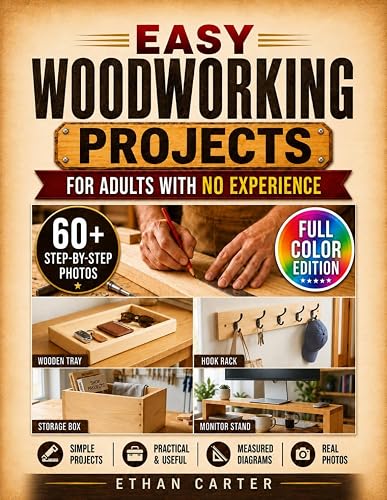 Best for adults with no experienceEasy Woodworking Projects for Adults with No ExperienceView on Amazon
Our Top Picks
| Product | Best for | Key feature |
|---|---|---|
| Complete Guide to CNC Woodworking | Learning CNC design from the ground up | 19 step-by-step projects covering fixtures and inlays |
| The Complete Woodworking Projects for Beginners | Hand-tool and basic-tool builders | Clear cut lists with illustrated plans |
| Modern CNC Woodworking Projects | Gift and small-batch makers | 51 designs for décor and keepsakes |
| A Beginner’s Guide to Easel CNC Software | Owners of X-Carve or GRBL routers | Walkthrough from setup to carving |
| Easy Woodworking Projects for Adults | Complete newcomers | Measured diagrams with real photos |
Complete Guide to CNC Woodworking: Everything You Need to Know to Use Any CNC Router
Complete Guide to CNC Woodworking: Everything You Need to Know to Use Any CNC Router (Fox Chapel Publishing) 19 Skill-Building Step-by-Step Projects from Clamps and Fixtures to Box Inlays
Best for: Learning CNC design from the ground up
This book suits woodworkers who already own or plan to buy a CNC router and want a structured path from first setup to finished pieces. It is especially useful if you want to understand how design files translate into toolpaths.
Key specs
- Format: print book, Fox Chapel Publishing
- Includes 19 skill-building, step-by-step projects
- Projects range from clamps and fixtures to box inlays
Pros
- Builds skills in a logical order
- Fixture projects help you plan repeatable setups
- Useful for any CNC router, not one brand
Cons
- Assumes some comfort with a computer and design files
- Machine-specific settings will still need your own testing
Bottom line: A strong pick for CNC owners who want a full learning path rather than a single project.
The Complete Woodworking Projects for Beginners
The Complete Woodworking Projects for Beginners: Build Useful Pieces for Your Home with Basic Tools, Clear Cut Lists, and Illustrated Step-by-Step Plans to Put Your Skills to Work
Best for: Best for beginners on a budget
This book fits builders who work mainly with basic hand and power tools and want useful home pieces. It is a practical starting point if you do not yet own a CNC machine or design software.
Key specs
- Format: print book focused on home-useful builds
- Includes clear cut lists for each project
- Illustrated step-by-step plans
Pros
- Cut lists make material planning straightforward
- Projects use common basic tools
- Good progression from simple to more involved builds
Cons
- Less focus on digital design workflows
- Limited coverage of advanced joinery
Bottom line: The most accessible pick for someone who wants practical plans without buying extra equipment.
Modern CNC Woodworking Projects: 51 Step-by-Step Designs
Modern CNC Woodworking Projects: 51 Step-by-Step Designs for Handmade Gifts, Home Décor, Personalized Keepsakes & Small-Batch Selling. (Modern CNC Maker Mastery)
Best for: Best for small-batch sellers
This book suits makers who want to produce gifts, décor and personalized keepsakes on a CNC router and possibly sell them in small runs. The design-focused projects show how to move from one-off builds to repeatable products.
Key specs
- Format: print book with 51 designs
- Covers handmade gifts, home décor and personalized keepsakes
- Includes a small-batch selling angle
Pros
- Large number of designs to choose from
- Useful for production planning and repeatable builds
- Gift-focused projects suit a wide range of skill levels
Cons
- Requires a CNC router to get the most from it
- Business advice, if any, is secondary to the projects
Bottom line: A good match for CNC owners who want a steady stream of design ideas for gifts and sales.
A Beginner’s Guide to Easel CNC Software and Easel Driver 0.4.5
A BEGINNER'S GUIDE TO EASEL CNC SOFTWARE AND EASEL DRIVER 0.4.5: Install, Connect, Design, and Carve with Confidence on X-Carve and Any GRBL CNC Router, from First Setup to Finished Projects
Best for: Best for X-Carve owners
This guide is built around a specific software workflow. It suits owners of X-Carve or other GRBL-based CNC routers who want to install, connect and carve using Easel-based tools.
Key specs
- Covers Easel CNC software and Easel Driver 0.4.5
- Targets X-Carve and any GRBL CNC router
- Walks through setup, design and carving
Pros
- Focused on one software workflow, so it is easy to follow
- Covers setup, not just design
- Helpful for first-time CNC owners
Cons
- Software versions change, so check the book matches your version
- Narrower scope than a general CNC book
Bottom line: Best for owners who already use the specified software and want a clear setup guide.
Easy Woodworking Projects for Adults with No Experience
Easy Woodworking Projects for Adults with No Experience: From First Cut to Projects You'll Be Proud to Share | Step-by-Step Plans with Real Photos and Measured Diagrams for Every Build
Best for: Best for adults with no experience
This book is aimed at complete newcomers who want to understand measurements and plans before they buy any design software. The real photos and measured diagrams help you match what you see on the page to what you cut.
Key specs
- Step-by-step plans with real photos
- Measured diagrams for every build
- Written for adults with no prior experience
Pros
- Measured diagrams make it easy to transfer dimensions
- Photos reduce guesswork on assembly
- Approachable tone for first-time builders
Cons
- Limited coverage of digital design tools
- May feel basic for experienced woodworkers
Bottom line: The right starting point for adults who want to learn planning and building before adding design software.
Buying Guide
Match the Resource to Your Machine
Decide first whether you work with hand tools, a table saw or a CNC router. A CNC-focused book or software guide will not help much if you only use hand tools, and a beginner book may feel thin if you already run a router. Check the scope in the listing before you buy.
Good picks for this: Complete Guide to CNC Woodworking, Easel CNC guide
Check the Skill Level Needed
Look for a note on experience level. Books aimed at adults with no experience usually explain basic measuring, marking and joinery. Advanced guides assume you can read a drawing and set up a machine on your own.
Good picks for this: Easy Woodworking Projects for Adults, The Complete Woodworking Projects for Beginners
Look for Cut Lists and Measured Diagrams
A good plan lists every part with its length, width, thickness and quantity. Measured diagrams help you check fit before cutting. Without these, you spend more time on math and less on building.
Good picks for this: The Complete Woodworking Projects for Beginners, Easy Woodworking Projects for Adults
Consider Your Use Case
If you build for gifts or to sell, look for designs that repeat well and can be made in small batches. If you build furniture for your home, focus on projects that teach joinery and proper sizing.
Good picks for this: Modern CNC Woodworking Projects, Complete Guide to CNC Woodworking
Confirm Software Compatibility
Software guides depend on specific versions and hardware. Before buying, confirm which software version the guide covers and whether it supports your controller, such as GRBL. Updates can change menus and workflows, so check the publication scope.
Good picks for this: A Beginner’s Guide to Easel CNC Software
Think About Durability and Reference Value
Print books are useful shop references because you can mark them up and keep them open at the bench. Look for clear layout, readable diagrams and a logical order you can return to.
Good picks for this: Complete Guide to CNC Woodworking, The Complete Woodworking Projects for Beginners
Plan for Safety and Shop Practices
Any project involving power tools or a CNC router needs safe habits: eye and hearing protection, dust control, secure workholding and tool setup checks. Good guides cover these basics. For guidance on shop safety standards, consult manufacturer manuals and a qualified professional.
Good picks for this: Complete Guide to CNC Woodworking, Easy Woodworking Projects for Adults
FAQ
What is the best software to design woodworking projects for a beginner?
For most beginners, a plan book with cut lists and measured diagrams is the easiest starting point. Once you are comfortable reading drawings, you can move to dedicated design software. Easy Woodworking Projects for Adults and The Complete Woodworking Projects for Beginners are good places to begin.
Do I need a CNC router to design woodworking projects?
No. Many designs are made for hand tools and table saws, and cut lists work with any shop setup. A CNC router is useful for carved or inlaid work, but it is not required for planning furniture or boxes.
Can I use these resources with X-Carve or other GRBL machines?
The Easel-focused guide is written for X-Carve and other GRBL CNC routers. The general CNC book also applies to any CNC router, though you will still need to adjust settings for your machine.
How do I make sure a plan will fit my materials?
Check the thickness and board sizes listed in the cut list, then compare them to the lumber you can buy. Adjust the design if your stock is thinner or shorter. Measure your actual boards before you cut.
Are these books useful if I want to sell my projects?
Modern CNC Woodworking Projects is aimed at gift and small-batch makers, so it is a good fit for that goal. Any book helps you plan repeatable builds, but check local rules and market demand before you sell.
Do I still need to learn joinery if I use design software?
Yes. Software helps you plan dimensions, but strong joints still depend on accurate cutting and fit. Learning basic joinery makes your designs easier to build and more durable.
Conclusion
For a full CNC learning path, Complete Guide to CNC Woodworking is the most complete choice. Beginners with basic tools will get the most from The Complete Woodworking Projects for Beginners, while small-batch sellers may prefer Modern CNC Woodworking Projects. X-Carve and GRBL owners should look at the Easel guide, and complete newcomers will find Easy Woodworking Projects for Adults a clear first step. Match the resource to your machine, skill level and goals, and you will get more value from your design time.
Sources
- Consumer safety guidance for power tools and home workshop practices (cpsc.gov)
- Workplace safety standards for woodworking machinery and dust control (osha.gov)
- Measurement and standards information relevant to accurate dimensioning (nist.gov)
Related reading
- 5 Best Software for Woodworking Plans to Design Your Next Build (2026)
- Woodworking Projects with 2x4s: 7 Best Books for Builders of Every Level
- Woodworking Projects to Sell on Etsy: 8 Ideas That Move (2026)
About Claire Whitaker
Claire Whitaker is part of our editorial team and reviews and edits our woodworking guides, checking product details against manufacturer specifications and owner feedback.